
大家好,我是一言,继续更新 Spring AI 2.0 系列。
前面几篇一直在写 Tool Calling:把 Java 方法注册给模型,让 Agent 查订单、读文件、执行命令。
能力一多,团队流程也会跟着变长。Tool 提供具体能力,Skill 保存任务步骤、规范和输出格式。对 Java 程序员来说,Tool 像方法,Skill 像业务 SOP。
这篇继续用电商案例,跑一个 order-cancellation Skill:先加载取消流程,再调用 queryOrder 和 cancelOrder,最后用真实模型检查完整调用链。
Agent Skills 是什么#
Skill = 触发条件 + 执行步骤 + 输出规范 + 可选资源Anthropic(A 社)在 2025 年提出 Agent Skills,官方把它比作“给新员工的入职手册”:模型具备通用能力,Skill 补充团队自己的办事方法。
每个 Skill 以 SKILL.md 为入口。name 和 description 负责触发,正文保存工作流,还可以附带资料、脚本和模板。

Agent Skills 官方规范采用三层加载:
常驻:name + description,约 100 Tokens
命中:完整 SKILL.md,建议控制在 5000 Tokens 内
需要时:references / scripts / assets
模型平时只看到简短元数据,选中任务后再拿完整流程和所需资源。
Spring AI 中怎么用 Agent Skills#
Spring AI 的 ChatClient 负责 Tool Calling 循环,Spring AI Community 的 SkillsTool 负责读取和加载 Skill:
扫描目录 → 暴露 name + description → 模型选择 Skill
→ 返回完整 SKILL.md → 调用业务 Tool → 最终回答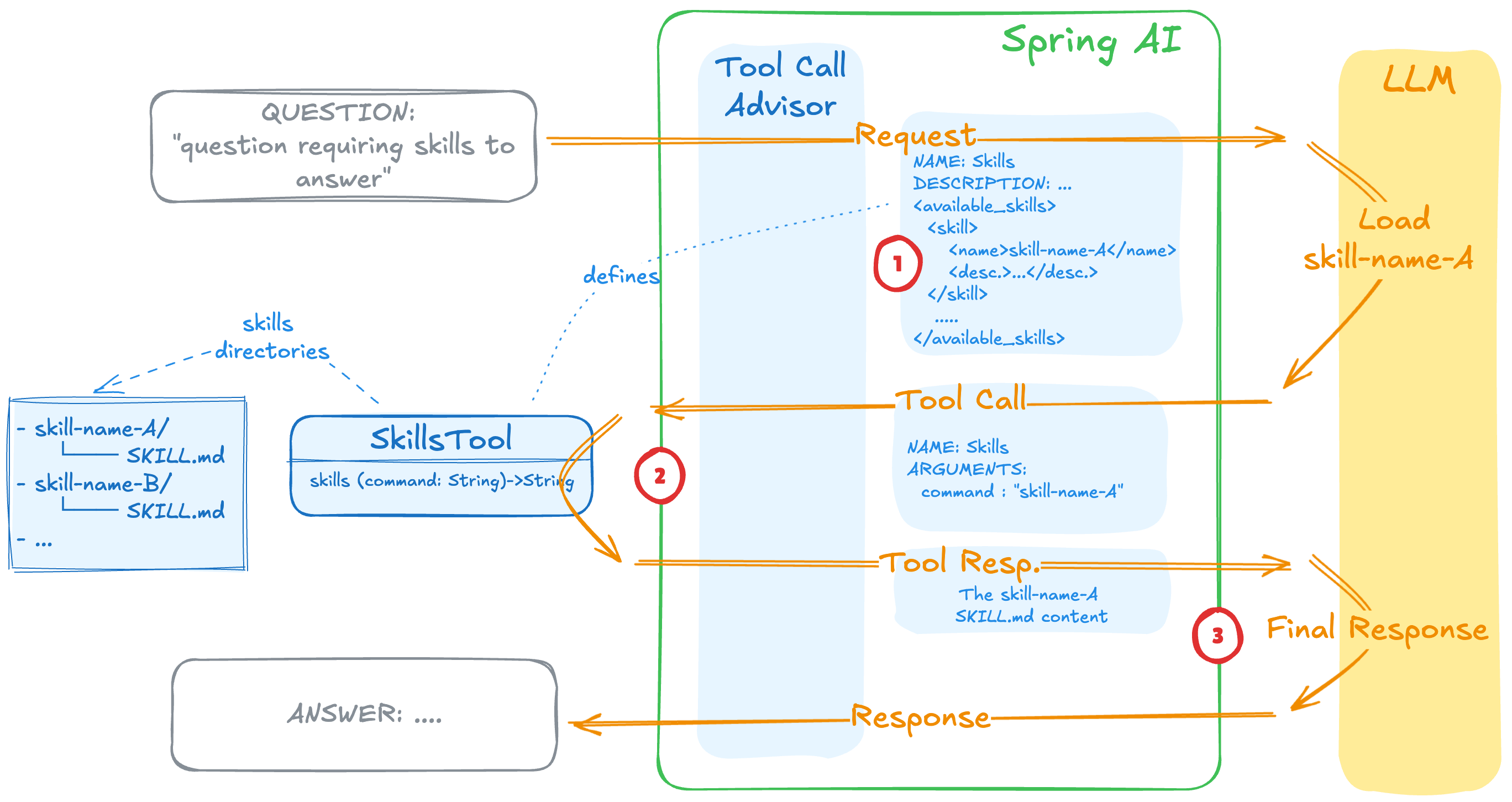
图里使用了抽象名称 skills,本文版本实际注册的工具名为单数 Skill。
这篇跑一个订单取消 Skill#
前面我们已经用 Tool Calling 跑过订单查询。这次再增加取消订单能力,并给 Agent 补一份团队流程:
请取消订单 ORD-1001,我确认取消。请按团队流程处理。演示订单的初始状态为 PENDING_PAYMENT。我们希望看到完整调用链:
Skill(order-cancellation)
  → queryOrder(ORD-1001)
  → cancelOrder(ORD-1001)
  → CANCELLED
演示只允许待支付订单直接取消。示例基于 Java 21、Spring AI 2.0.1 和 spring-ai-agent-utils 0.12.0,真实模型使用豆包 doubao-seed-2-1-turbo-260628。
第一步:添加依赖#
Agent Skills 来自 Spring AI Community 的 spring-ai-agent-utils,本文固定使用 0.12.0:
<dependency>
    <groupId>org.springaicommunity</groupId>
    <artifactId>spring-ai-agent-utils</artifactId>
    <version>0.12.0</version>
</dependency>
Spring AI 版本通过 BOM 固定为 2.0.1。
第二步:编写 SKILL.md#
在 skills/order-cancellation/SKILL.md 中写入:
---
name: order-cancellation
description: Use when the user asks to cancel an e-commerce order or check whether an order can be cancelled.
---

# Order Cancellation

## Workflow

1. Extract the order id. Ask the user when it is missing.
2. Call `queryOrder` before any write operation. Never infer the current status.
3. Confirm that the user explicitly asked to cancel the order.
4. When the status is `PENDING_PAYMENT`, call `cancelOrder` with the same order id.
5. When the status is `PAID`, `SHIPPED`, or `COMPLETED`, do not call `cancelOrder`; explain that this demo requires the refund or after-sales workflow.
6. When the status is `CANCELLED`, report that no further action is needed.

## Output

Return the order id, original status, action result, and the next step in concise Chinese.
description 决定模型何时选择这项流程,正文规定先查询状态,再决定是否取消。一个 Skill 可以编排多个 Tool,两个 Tool 的 Java 实现仍然独立注册和执行。
第三步:提供两个订单 Tool#
为了把调用链看清,Demo 用内存字段保存订单状态:
public final class OrderTools {

    private String status = "PENDING_PAYMENT";

    @Tool(name = "queryOrder",
            description = "Query the current status of an e-commerce order by order id")
    public OrderSnapshot queryOrder(
            @ToolParam(description = "Order id") String orderId) {
        return new OrderSnapshot(orderId, status);
    }

    @Tool(name = "cancelOrder",
            description = "Cancel an e-commerce order by order id and return the result")
    public CancellationResult cancelOrder(
            @ToolParam(description = "Order id") String orderId) {
        String previousStatus = status;
        if (!"PENDING_PAYMENT".equals(previousStatus)) {
            return new CancellationResult(
                    orderId, previousStatus, previousStatus,
                    false, "当前状态不允许直接取消");
        }

        status = "CANCELLED";
        return new CancellationResult(
                orderId, previousStatus, status,
                true, "订单取消成功");
    }

    public record OrderSnapshot(String orderId, String status) {}

    public record CancellationResult(
            String orderId, String previousStatus, String status,
            boolean success, String message) {}
}
Skill 负责调用顺序,Java 代码强制校验状态。正式项目还要校验用户身份、确认态和幂等性。
第四步:一起注册给 ChatClient#
创建 SkillsTool,再和订单 Tool 一起注册:
@Bean
ChatClient chatClient(ChatClient.Builder builder) {
    ToolCallback skillTool = SkillsTool.builder()
            .addSkillsDirectory(
                    Path.of("skills").toAbsolutePath().toString())
            .build();
    OrderTools orderTools = new OrderTools();

    return builder
            .defaultTools(skillTool, orderTools)
            .build();
}
addSkillsDirectory 读取文件系统目录;Skill 随 JAR 发布时,可以改用 addSkillsResource(...) 从 Classpath 加载。
第五步:发起请求#
调用方式仍是普通 ChatClient:
String answer = chatClient.prompt()
        .system("""
                你是电商研发助手。遇到匹配的 Skill 时,
                先加载流程,再执行流程要求的 Tool。
                """)
        .user("请取消订单 ORD-1001,我确认取消。请按团队流程处理。")
        .call()
        .content();
System Prompt 没有写取消步骤,也没有指定 Skill 名称。接入豆包后得到:
route[order-cancellation]=Skill({"command": "order-cancellation"})
loadedOnly[order-cancellation]=true
toolSequence[order-cancellation]=queryOrder(ORD-1001) -> cancelOrder(ORD-1001)
orderStatus[ORD-1001]=CANCELLED
answer[order-cancellation]=订单号:ORD-1001 原状态:待支付 操作结果:取消成功
loadedOnly=true 表示只加载了订单取消流程,后两行检查 Tool 顺序和最终状态。
一次技能加载经历了什么#
SkillsTool 把所有 Skill 的 Frontmatter 放进 Tool description。模型选中后调用 Skill({"command":"order-cancellation"}),工具返回基础目录和完整 SKILL.md。ChatClient 再让模型继续调用 queryOrder 和 cancelOrder。
这里的“按需加载”指完整正文按需进入模型上下文。
0.12.0 源码没有向量索引或相似度打分,Skill 由模型根据 name、description 和用户问题选择。因此,description 本身就是路由配置。
最后#
记住这条链路就够了:
name + description → Skill(command) → 完整 SKILL.md
→ 业务 Tool → 结果断言
如果 System Prompt 已经混进多套团队 SOP,可以先挑一套边界清楚的流程做成 Skill。把选择、加载、Tool 顺序和业务结果分别断言,跑稳后再增加下一套流程。
参考资料#
- Anthropic:用 Agent Skills 为 Agent 增加真实工作能力
- Spring Blog:Agent Skills——可复用的 Agent 能力
- Spring Blog:Spring AI 2.0.0 GA
- Agent Skills Specification
- spring-ai-agent-utils 0.12.0 Release
- spring-ai-agent-utils 0.12.0:SkillsTool 源码