
大家好,我是一言,继续更新 Spring AI 2.0 系列。
平时使用 Codex 或者各种 Agent,你有没有遇到过这种情况?
任务已经开始执行,Agent 突然停下来,让你再补充一些信息:
“部署到测试环境还是生产环境?”
“目标文件已经存在,是否覆盖?”
有些参数不能猜,有些操作也需要用户亲自确认。
MCP Elicitation 就用在这里:Tool 执行过程中,MCP Server 向 Client 发起结构化补问。用户填写后,原来的 Tool 接着执行。
这篇就用订单退款,跑一遍完整流程。
先用 Postman 看清这条链路#
我用 Java 21、Spring Boot 4.0.8 和 Spring AI 2.0.1 写了一个最小案例,再用 Postman 充当 MCP Client。
新建一个 MCP Request,传输方式选择 HTTP,连接:
http://localhost:8082/mcpPostman 加载出 applyRefund 后,填写 orderId=A1024 并点击 Run。Tool 已经开始执行,页面没有立即拿到退款结果。Response 区先收到一条 elicitation/create。
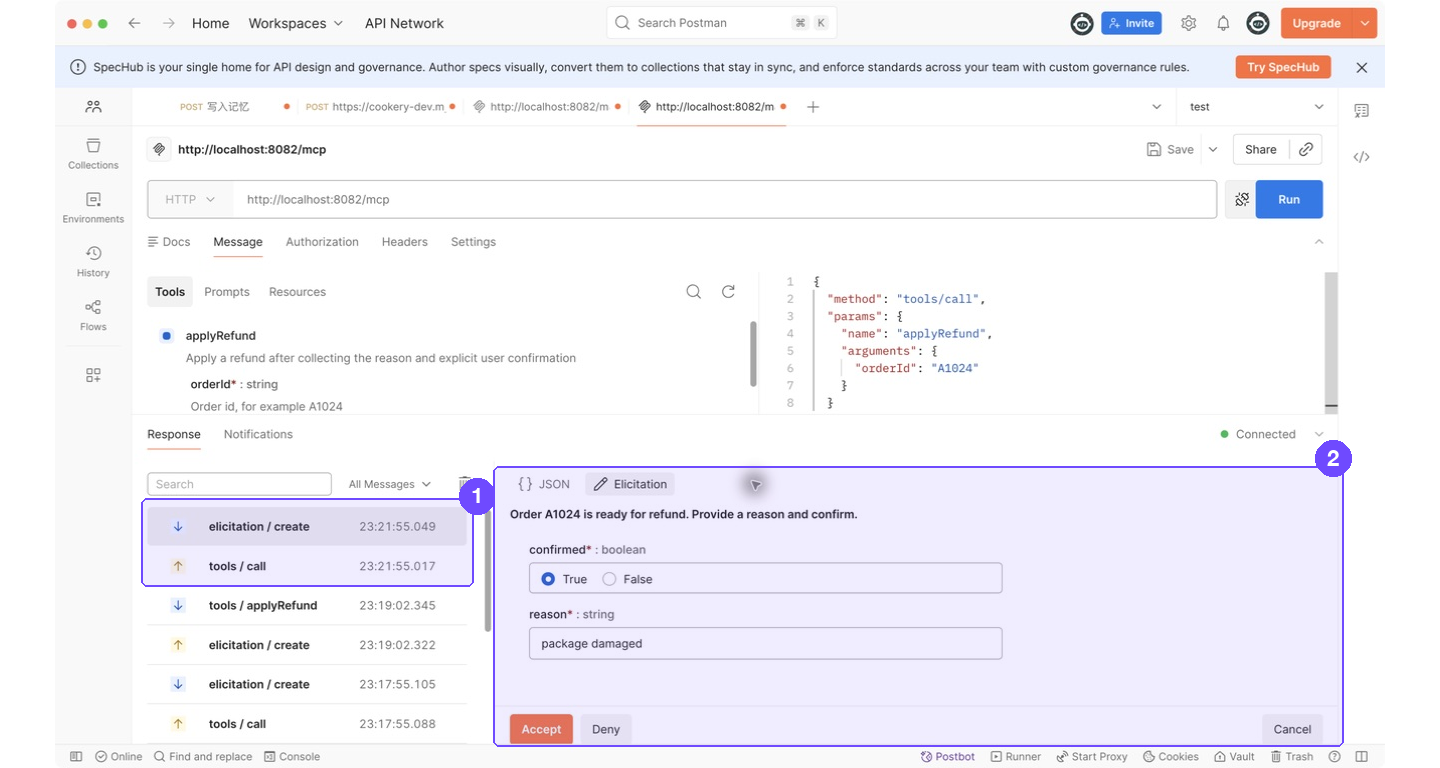
先把 Postman 里的几个英文项翻译一下:
| Postman 界面 | 中文含义 | 当前案例中的作用 |
|---|---|---|
tools / call |
调用工具 | Postman 请求 Server 执行 applyRefund |
elicitation / create |
发起补问 | Server 执行到确认节点,向 Postman 索要缺失信息 |
Elicitation |
补问表单 | Postman 根据 requestedSchema 自动生成表单 |
confirmed |
是否确认执行 | 选择 True 才允许继续退款 |
reason |
退款原因 | 本次填写 package damaged |
Accept |
接受并提交 | 返回 ACCEPT + content,Tool 继续执行 |
Deny |
拒绝 | Postman 返回 DECLINE,Tool 停止执行 |
Cancel |
取消本次交互 | Postman 返回 CANCEL,Tool 停止执行 |
把图中的动作连起来,就是下面四步:
- Postman 发送
tools/call,开始调用applyRefund。 - Server 发现还缺退款原因和用户确认,发送
elicitation/create,原来的 Tool 调用在这里等待。 - Postman 打开
Elicitation表单,用户填写reason,再选择confirmed=True。 - 用户点击
Accept,Postman 把表单内容交回 Server,applyRefund从等待位置继续执行。
点击 Accept 后,Response 区出现最终结果:
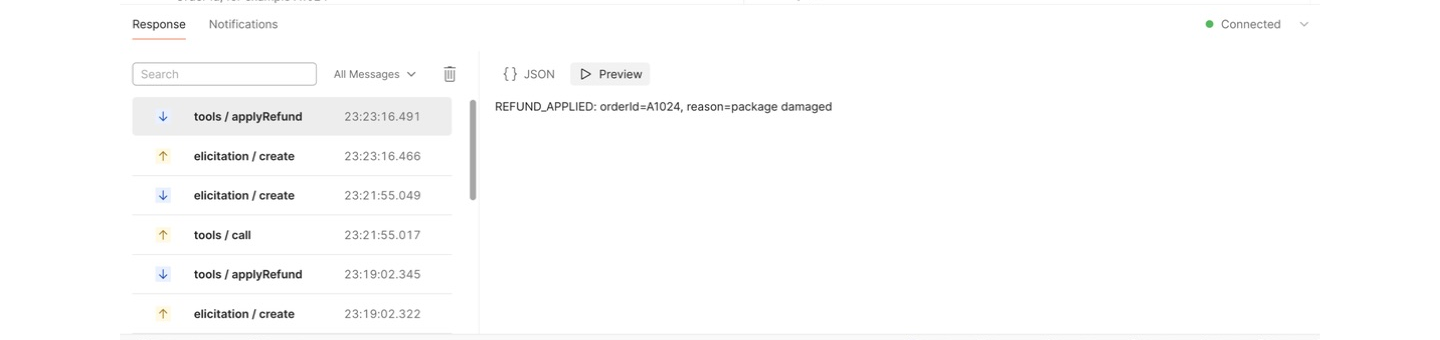
REFUND_APPLIED: orderId=A1024, reason=package damaged如果点击 Deny,案例会返回 REFUND_NOT_APPLIED: user decline,退款业务不会执行。
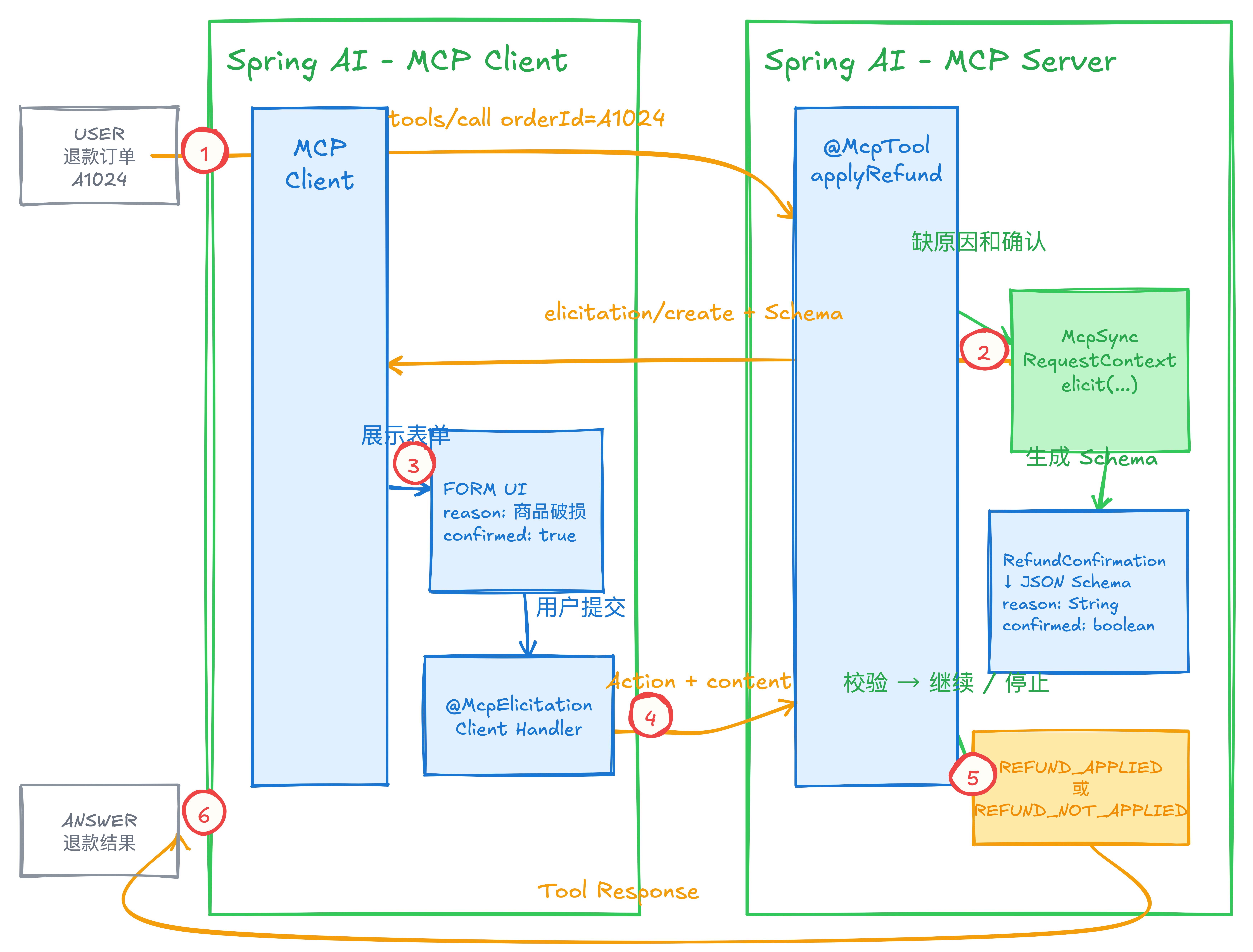
Server 端:在 @McpTool 中发起补问#
服务端引入 WebFlux MCP Server Starter:
<dependency>
    <groupId>org.springframework.ai</groupId>
    <artifactId>spring-ai-starter-mcp-server-webflux</artifactId>
</dependency>
配置 Stateful Streamable HTTP:
server.port=8082

spring.ai.mcp.server.name=refund-server
spring.ai.mcp.server.version=1.0.0
spring.ai.mcp.server.type=SYNC
spring.ai.mcp.server.protocol=STREAMABLE
spring.ai.mcp.server.streamable-http.mcp-endpoint=/mcp
spring.ai.mcp.server.request-timeout=5m
这里把请求超时设为 5 分钟,方便在 Postman 里停留、截图和手工填写表单。线上项目要结合交互时长和服务端资源重新设置。
补问结果用一个简单的 Record 接收:
public record RefundConfirmation(
        String reason,
        boolean confirmed) {
}
工具方法增加 McpSyncRequestContext,通过 context.elicit(...) 发起补问:
@McpTool(
    name = "applyRefund",
    description = "Apply a refund after collecting the reason and explicit user confirmation"
)
public String applyRefund(
        McpSyncRequestContext context,
        @McpToolParam(description = "Order id, for example A1024")
        String orderId) {

    if (!context.elicitEnabled()) {
        return "REFUND_NOT_APPLIED: client does not support elicitation";
    }

    StructuredElicitResult<RefundConfirmation> result = context.elicit(
            spec -> spec.message("Order " + orderId
                    + " is ready for refund. Provide a reason and confirm."),
            RefundConfirmation.class);

    if (result.action() != ElicitResult.Action.ACCEPT) {
        return "REFUND_NOT_APPLIED: user "
                + result.action().name().toLowerCase();
    }

    RefundConfirmation form = result.structuredContent();
    if (form == null || !form.confirmed()) {
        return "REFUND_NOT_APPLIED: confirmation was false";
    }

    return refundService.apply(orderId, form.reason());
}
Spring AI 会根据 RefundConfirmation 生成 Form Elicitation 的 JSON Schema。Client 返回 ACCEPT 后,响应中的 Map 会转成 RefundConfirmation。
elicitEnabled() 用来检查当前 Client 有没有声明 Elicitation capability。跳过这步,遇到不支持的 Client,elicit(...) 会抛出 IllegalStateException。
业务 Client:用 @McpElicitation 接住补问#
Postman 适合把协议过程看明白。接入自己的 Java Client 后,用 @McpElicitation 注册处理方法,把补问交给前端表单或客户端对话框。
Client 引入 WebFlux Starter:
<dependency>
    <groupId>org.springframework.ai</groupId>
    <artifactId>spring-ai-starter-mcp-client-webflux</artifactId>
</dependency>
配置连接:
spring.ai.mcp.client.type=SYNC
spring.ai.mcp.client.streamable-http.connections.refund-server.url=http://localhost:8082
客户端用 @McpElicitation 注册回调:
@McpElicitation(clients = "refund-server")
public ElicitResult confirmRefund(ElicitRequest request) {
    if (!(request instanceof McpSchema.ElicitFormRequest formRequest)) {
        return new ElicitResult(ElicitResult.Action.DECLINE, null);
    }

    System.out.println(formRequest.message());
    System.out.println(formRequest.requestedSchema());

    // 测试时固定提交。实际项目在这里连接前端表单或客户端对话框。
    return new ElicitResult(ElicitResult.Action.ACCEPT, Map.of(
            "reason", "package damaged",
            "confirmed", true));
}
clients 的值要和配置中的 connection name 一致。Spring AI 按这个名字把回调绑定到对应的 MCP Client。
这里有一个 2.0 API 细节。MCP Java SDK 2.0.0 中,ElicitRequest 是接口,Form 补问的 Schema 在 ElicitFormRequest 上。先判断请求类型,再读取 requestedSchema()。
@McpElicitation 负责把协议回调路由到这个 Java 方法。页面怎么弹出、Schema 怎么渲染、用户输入怎么等待,都由 MCP Client 应用实现。
三种 Action 怎么处理#
| Action | 用户动作 | Server 处理 |
|---|---|---|
ACCEPT |
审阅并提交内容 | 再做业务校验,通过后执行 |
DECLINE |
明确拒绝请求 | 停止操作,返回可理解的状态 |
CANCEL |
关闭或中止交互 | 停止操作,由 Client 提供重试入口 |
ACCEPT 只表示用户提交了这份表单。订单归属、可退状态、金额和原因长度,服务端仍要校验。
Elicitation 和聊天追问放在哪一层#
| 对比项 | 聊天追问 | MCP Elicitation |
|---|---|---|
| 发起方 | 模型生成自然语言 | MCP Server 发起协议请求 |
| 发生位置 | 对话流程 | 当前 Tool 执行过程 |
| 输入形式 | 一段文本 | JSON Schema 约束的字段 |
| 返回结果 | 需要继续理解用户文本 | Action + content |
| 常见用途 | 补充问题背景 | 补参数、选项、确认操作 |
退款确认、部署环境选择、文件覆盖确认,这类需要人明确选择后才能继续的操作,很适合放到 Elicitation。
最后#
Elicitation 给 MCP Tool 增加了一个明确的人工介入点:
Tool 开始执行
  → Server 发起结构化补问
  → Client 展示给用户
  → 用户提交 / 拒绝 / 取消
  → Server 验证结果
  → Tool 继续或停止
它很适合需要补充关键字段、审阅参数和确认高风险操作的 Agent 流程。
参考资料#
- Spring AI 2.0.1:MCP Client Annotations
- Spring AI 2.0.1:MCP Server Annotations
- Spring AI 2.0.1:MCP Overview
- Postman:Interact with MCP servers
- Spring AI 2.0.1:
DefaultMcpSyncRequestContext源码 - MCP Java SDK 2.0.0:
ElicitRequest与ElicitFormRequest - MCP 2025-11-25:Elicitation
- Spring AI 2.0.1:Streamable MCP Annotations 集成测试